

TM 5-3805-280-24-1
Tests
d. Click on Excavator Diagnostics.
For starting from the Programs menu:
2. The John Deere Main Menu screen opens. The
a. Click on Start button in lower left corner of
menu screen is the gateway to the excavator
screen.
diagnostic program.
b. Click on Programs in Start menu.
c. Click on John Deere App Group in the
Programs menu.
TX,9025,GG2670 1922APR983/5
9025
25
9
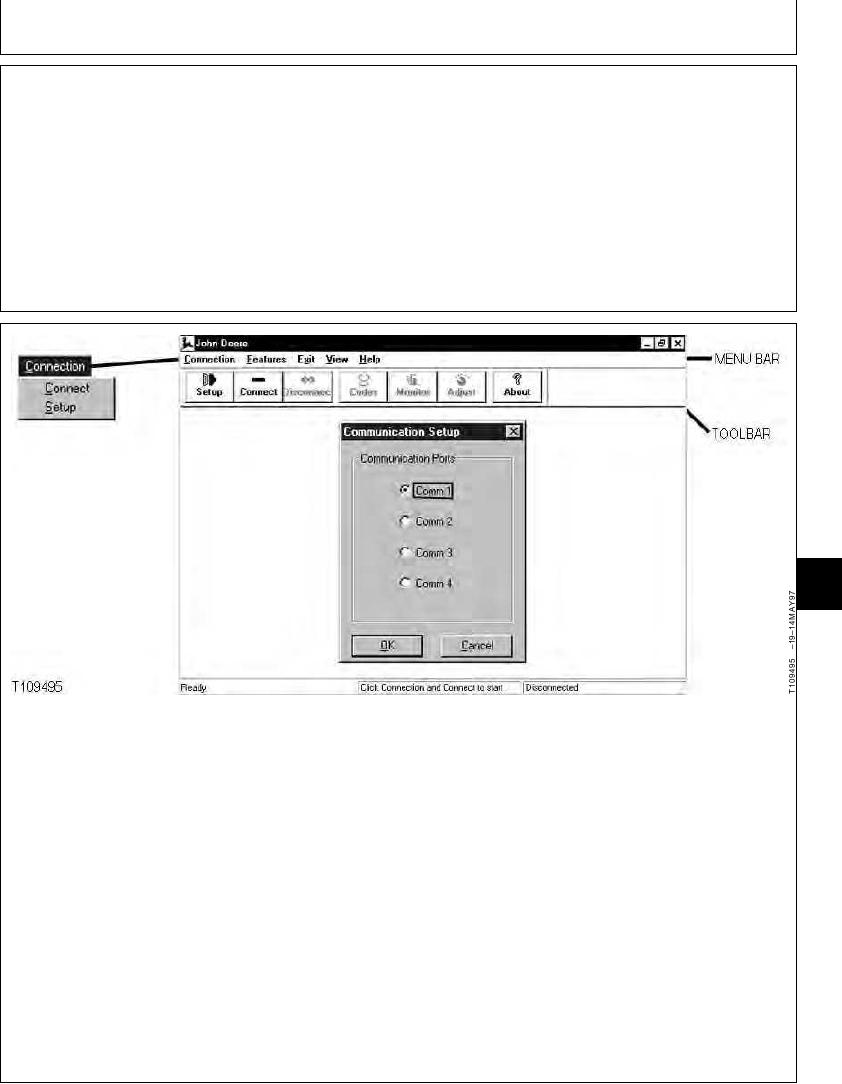
3. The first time the excavator diagnostics program is
b. When the Communication Setup window
used on the laptop computer, a communication port
opens, click on the communication port your
must be selected.
computer needs for communication with the
excavator. Most computers use Comm 1.
a. Click on the Setup button on the Toolbar or on
the Connection drop down menu on the Menu
c. Using the left mouse button, click on the X in the
Bar and then click on Setup.
upper right corner of Communication Setup
window to close it.
NOTE: If the Toolbar is not displayed, click on the
View drop menu and then click on Toolbar.
Also click on Status Bar if not displayed at
bottom of window.
Continued on next page
TX,9025,GG2670 1922APR984/5
6-139