

TM 5-3805-281-10
Operator's Station
CAB HEATER OPERATION
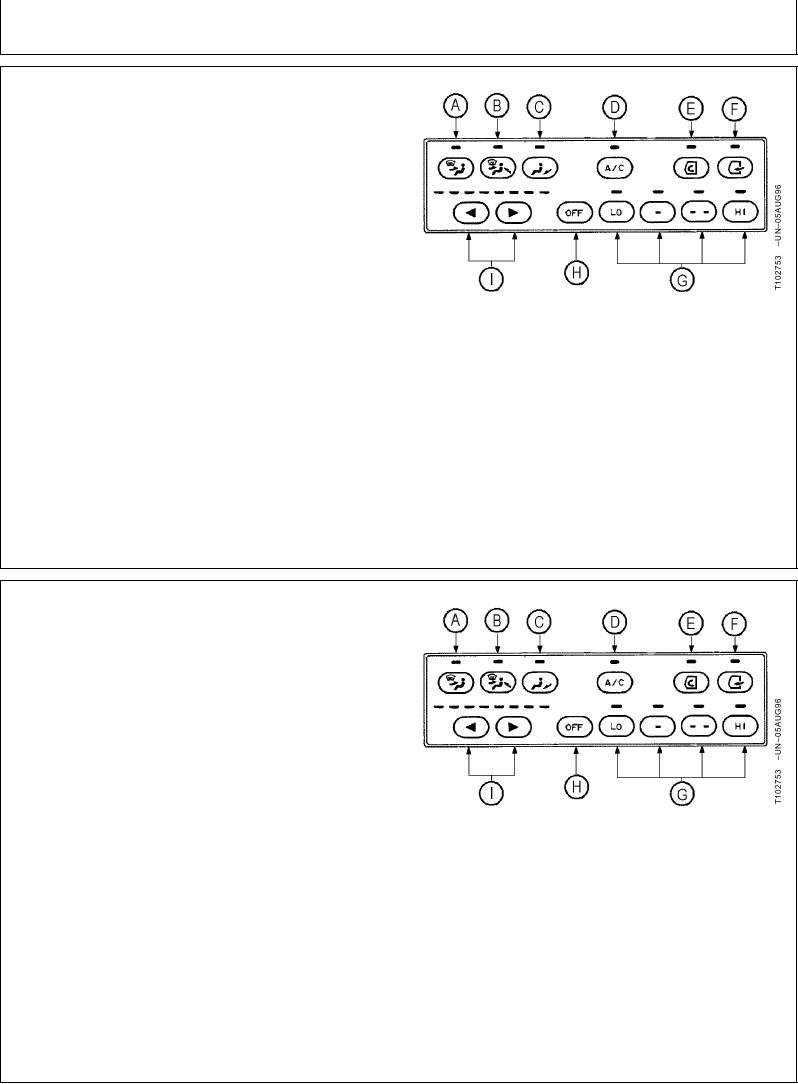
1. Press desired mode switch (A, B, or C).
2. Press right temperature control switch (I) until all
indicators are red.
3. Press blower switch (G to select desired blower speed.
4. Press air conditioner switch (D) to turn indicator off if
not already off.
5. Press temperature control switches and blower
A--Mode Switch
switches to adjust cab temperature
B--Mode Switch
C--Mode Switch
D--Air Conditioner Switch
E--Air Vent Switch
F--Fresh Air Vent Switch
G--Blower Switches
H--Blower OFF Switch
I--Temperature Control Switches
TX,10,DH5057 1920JUN961/1
AIR CONDITIONER OPERATION
1. Press desired mode switch (A, B, or C).
2. Press left temperature control switch (I) until all
indicators are green.
3. Press blower switch (G) to select desired blower
speed.
4. Press air conditioner switch (D) to turn indicator green
if not already green.
A--Mode Switch
5. Press temperature control switches and blower
B--Mode Switch
switches to adjust cab temperature
C--Mode Switch
D--Air Conditioner Switch
E--Air Vent Switch
F--Fresh Air Vent Switch
G--Blower Switches
H--Blower OFF Switch
I--Temperature Control Switches
TX,10,DH5058 1920JUN961/1