

TM 5-3805-281-24-2
Group 1676
Instruments and Indicators
REPLACE MONITOR PANEL AND SWITCH
PANEL BULB
1. Remove monitor controller. (See procedure in Group
1675.)
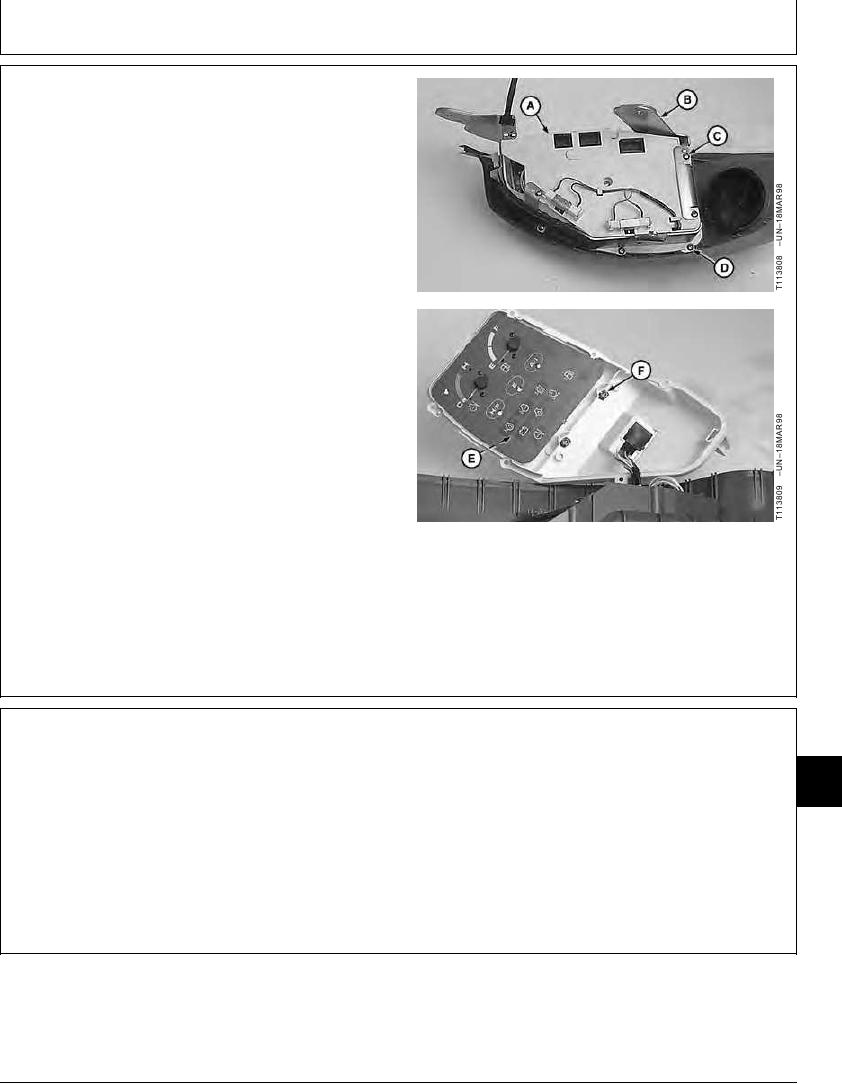
2. Remove cap screws (C) and bracket (B).
3. Remove cap screws (D) and monitor controller (A).
4. Replace bulbs (E and F) as necessary.
A--Monitor Controller
B--Bracket
C--Cap Screw (4 used)
D--Cap Screw (6 used)
E--Monitor Panel Bulb (12 used)
F--Switch Panel Bulb (2 used)
CED,OUOE024,229
1920MAY981/1
REMOVE AND INSTALL MONITOR PANEL
16
1. Remove monitor controller. (See Remove and Install
1676
Monitor Controller in Group 1675.)
1
Continued on next page
CED,OUOE042,183
1923JAN981/3