

TM 5-3805-281-24-1
Tests
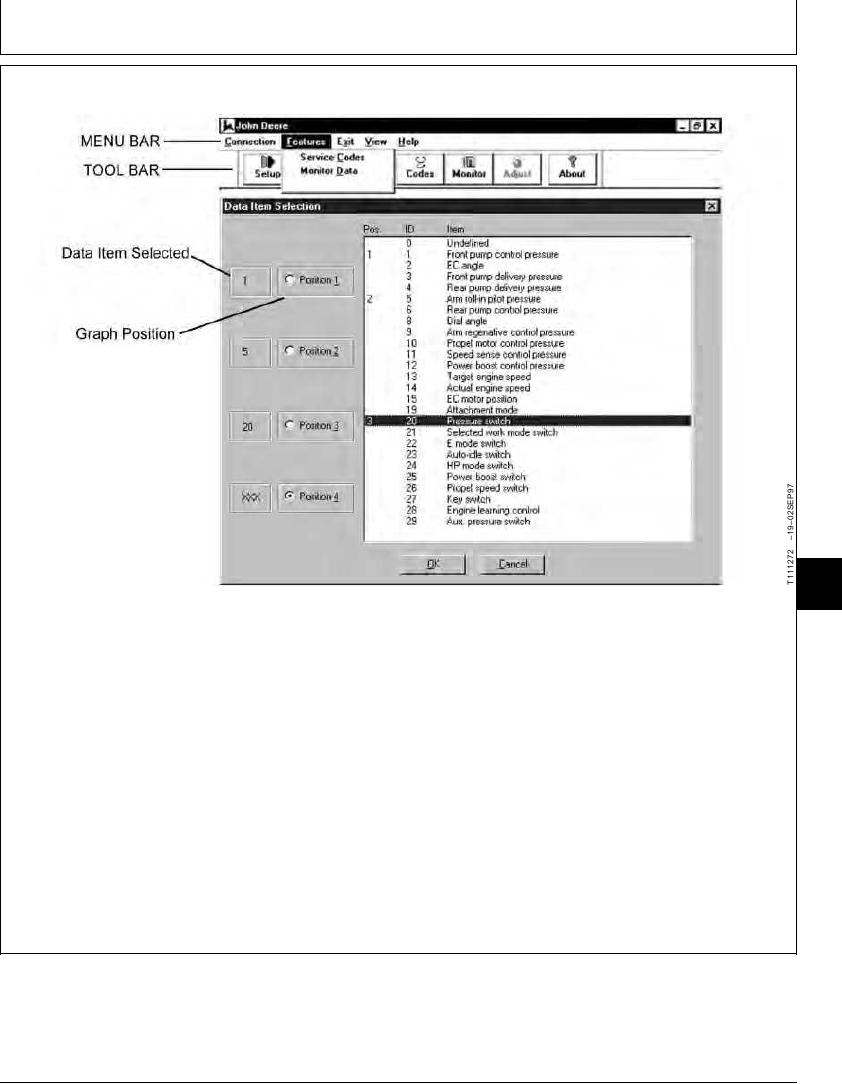
EXCAVATOR DIAGNOSTICS PROGRAM FEATURE--MONITOR DATA
9025
25
15
down cursor keys and the Enter key also works for
1. Click on the Monitor button on Toolbar or on the
selecting data items.
Features drop down menu on the Menu Bar and
then click on Monitor Data to open the Data Item
After your first choice has been made, the next
Selection window. (See Excavator Diagnostic
Graph Position is highlighted and allows you to
Software Monitor Data Items in this group.)
make your second choice. You may choose a data
item for each of the four Graph Positions.
2. Double click (or click once and press the Enter key)
on a data item and its ID number appears in the
3. After choices have been made, click OK to view
Data Item Selected box at the Graph Position that
data in graph form in the Monitor Data window.
is highlighted on the left of the screen. The up and
Continued on next page
TX,9025,GG2673 1919NOV971/3