

TM 5-2420-230-24-1
a. Removal.
Remove all jewelry such as rings, dog tags,
bracelets, etc. If jewelry or tools contact
positive electrical circuits, a direct short may
result. Damage to equipment and injury or
death to personnel may occur.
NOTE
Remove cable ties as necessary.
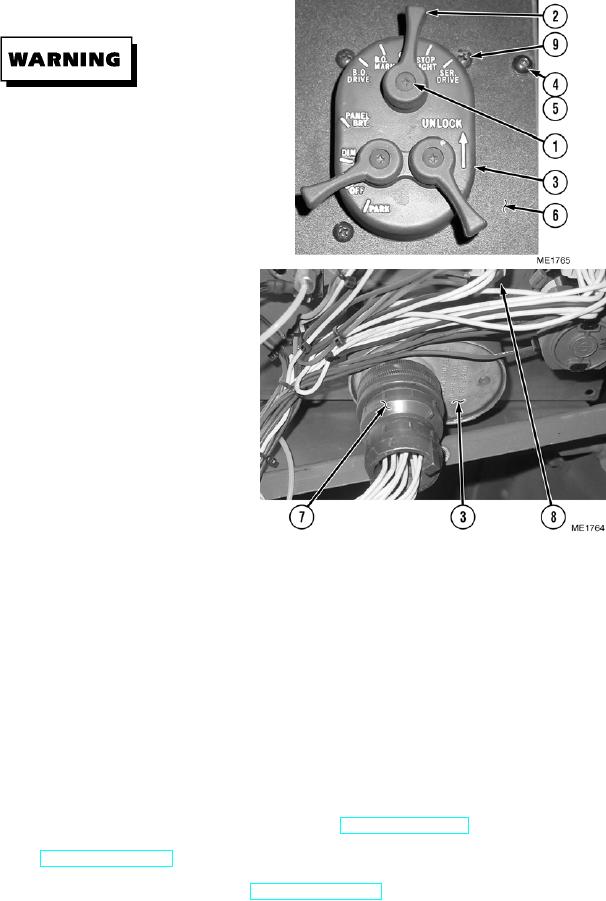
(1)
Remove three screws (1) and knobs (2) from
master light switch (3).
(2)
Remove eight screws (4), washers (5), and
dash panel (6).
(3)
Disconnect cannon plug (7) from master
light switch (3).
(4)
Remove four nuts (8) from screws (9).
(5)
Remove four screws (9) and master light
switch (3) from dash panel (6).
b. Installation.
NOTE
Install cable ties as necessary.
(1)
Install four screws (9) and master light switch (3) on dash panel (6).
(2)
Install four nuts (8) on screws (9).
(3)
Connect cannon plug (7) to master light switch (3).
(4)
Install dash panel (6) with eight screws (4) and washers (5).
(5)
Install knobs (2) on master light switch (3) with three screws (1).
c. Follow-On Maintenance.
(1)
Start vehicle and check for proper operation of master light switch (TM 5-2420-230-10).
(2)
Shut OFF engine (TM 5-2420-230-10).
(3)
Remove "Do Not Operate" tag from ignition switch (TM 5-2420-230-10).
END OF TASK
Change 1
12-18