

TM 5-3805-280-24-14-2
T 5-3805-280-2
System Controls
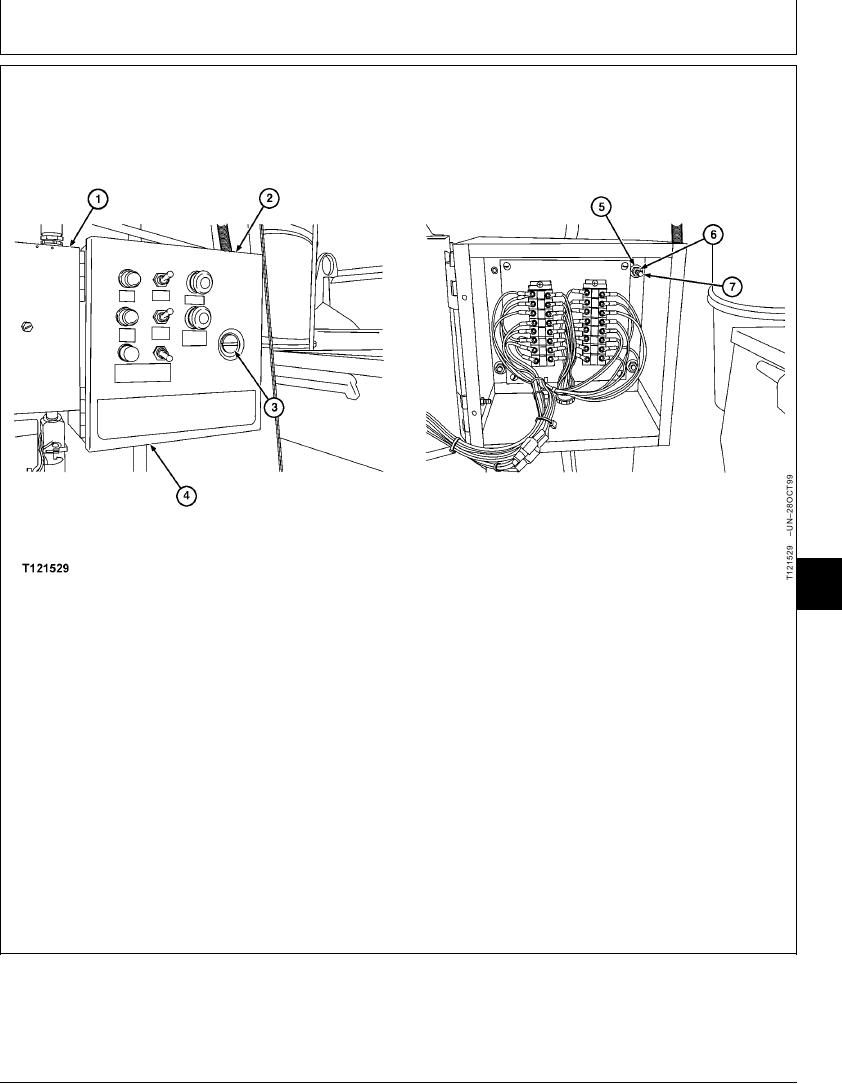
REMOVE AND INSTALL COMPRESSOR REMOTE CONTROL PANEL
16
1675
11
1--Control box
3--Latch
5--Washers (3 used)
7--Studs (3 used)
2--Control panel
4--Harness connector
6--Nuts (3 used)
5. Remove control panel (2).
1. Remove control box (1). (See Remove and Install
Rock Drill Start--Stop Selector Control Box in
6. Install control panel (2) onto studs (7).
this group).
7. Install washers (5) and tighten nuts (6).
2. Remove harness connector (4).
8. Close remote instrument control panel (2) and turn
3. Turn latch (3) counterclockwise and open remote
latch (3) clockwise to lock.
instrument control panel (2).
9. Connect harness connector (4).
4. Support control panel (2), remove nuts (6) and
washers (5).
CED,OUOE023,3 1927MAY991/1
16-80