

TM 5-3805-294-23-4
0572
DISASSEMBLY - Continued
73, 74, 75
77
76
20
78, 79, 80
HYEX02608
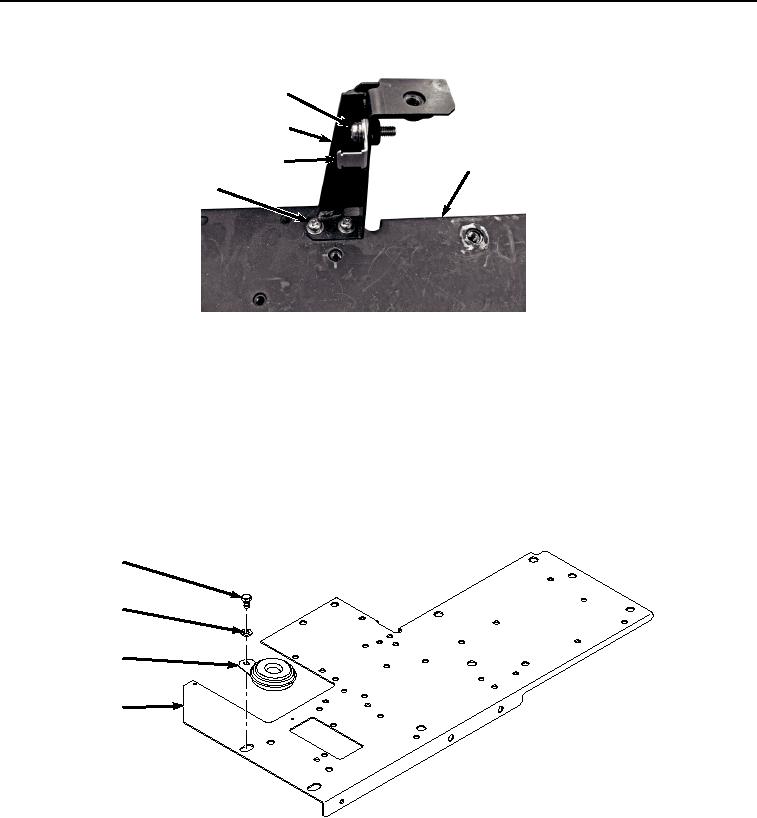
Figure 19.
Monitor Warning Alarm Bracket Removal.
6.
Remove two screws (Figure 19, Item 78), lockwashers (Figure 19, Item 79), washers (Figure 19, Item 80), and
monitor warning alarm bracket mount (Figure 19, Item 77) from bracket (Figure 19, Item 20). Discard
NOTE
Only perform Step 7 if armored cab is installed.
7.
Remove bolt (Figure 20, Item 81), washer (Figure 20, Item 82), and security alarm (Figure 20, Item 22) from
bracket (Figure 20, Item 20).
81
82
22
20
HYEX03302
Figure 20.
Security Alarm Removal.
END OF TASK
ASSEMBLY
NOTE
Only perform Step 1 if armored cab is installed.