

TM 5-3805-294-23-4
0607
REMOVAL
14.
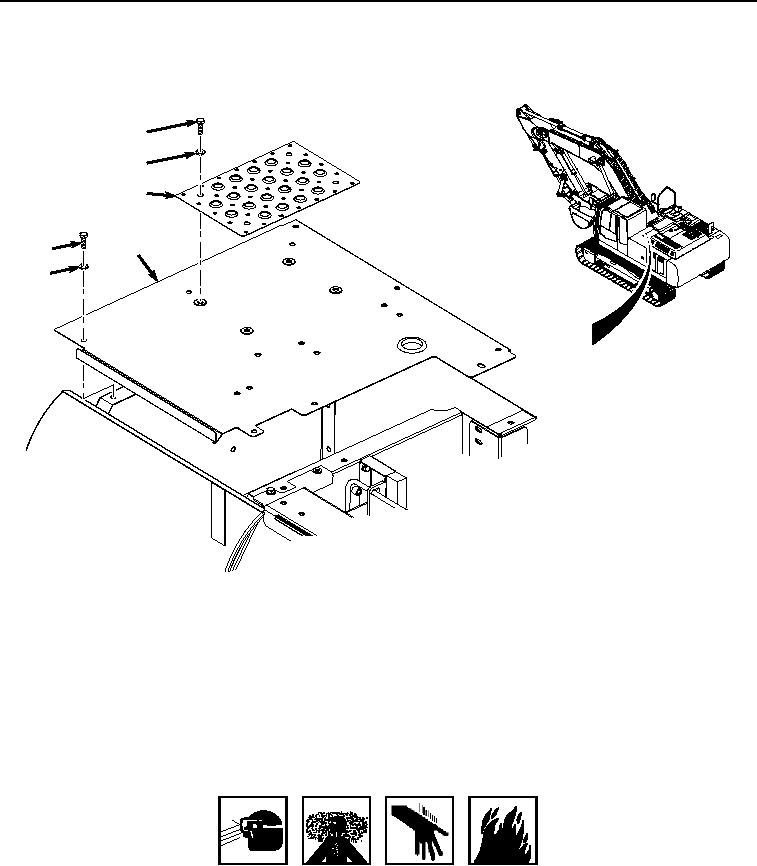
Remove six bolts (Figure 7, Item 27) and washers (Figure 7, Item 28) from cover (Figure 7, Item 10).
29
30
31
10
27
28
HYEX00461
Figure 7. Storage Compartment Cover Removal.
15.
With the aid of an assistant, remove cover (Figure 7, Item 10) from machine.
16.
Remove four bolts (Figure 7, Item 29), washers (Figure 7, Item 30), and cover (Figure 7, Item 31) from cover
(Figure 7, Item 10).
END OF TASK
INSTALLATION
WARNING
ADHESIVES AND SEALANTS
1.
Apply thread lock to threads of four screws (Figure 8, Item 29).